RouteKeeper Vision
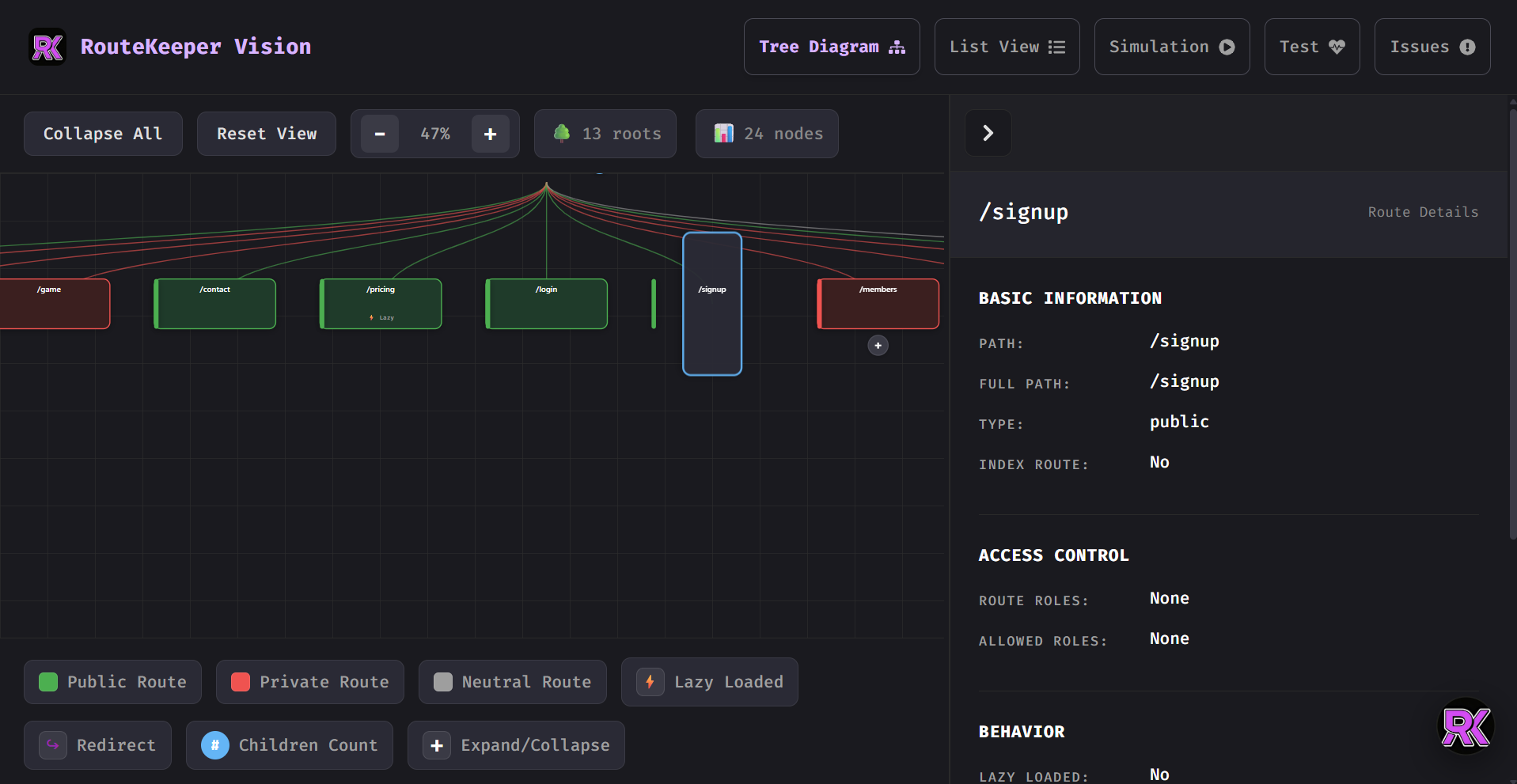
The RouteKeeper Vision is a developer-focused plugin for Routekeeper that lets you understand your React Router configuration visually. It transforms your route definitions into an interactive, hierarchical route graph, making complex routing logic easy to explore, debug, and validate.
Installation
npm install routekeeper-vision


yarn add routekeeper-vision


pnpm add routekeeper-vision
Setup
This is used with routekeeper
import React, { useMemo } from "react";
import { BrowserRouter } from "react-router-dom";

import { RouteKeeper,defineRoutes } from "routekeeper-react";
import { RouteKeeperVision } from "routekeeper-vision";


import Home from "./pages/Home";
import Login from "./pages/Login";
import Dashboard from "./pages/Dashboard";
import NotFound from "./pages/NotFound";
import ShareFile from "./pages/ShareFile"

const userIsLoggedIn = true;
const isLoading = false;

export default function App() {
  const routes = defineRoutes([
      {
        path: "/",
        element: <Home />,
      },
      {
        path: "/login",
        element: <Login />,
        type: "public",
      },
      {
        path: "/dashboard",
        element: <Dashboard />,
        type: "private",
      },
      {
        path: "/sharefile",
        element: <ShareFile />,
        type: "neutral",
      },
    ],
  );

  return (
    <BrowserRouter>
      <RouteKeeper
        routes={routes}
        auth={userIsLoggedIn}
        loading={isLoading}
        visualizer={{
          enabled: true,
          render: () => <RouteKeeperVision routes={routes} />,
        }}
      />
    </BrowserRouter>
  );
}
Why the Visualizer Exists
As applications grow, routing logic becomes harder to reason about:
- Nested routes become deeply layered
- Guards and role-based access add hidden complexity
- Redirects and fallbacks obscure actual navigation flow
The Visualizer solves this by providing a single source of truth view for how your routes behave at runtime.
Core Capabilities
Route Visualization
- Displays List or Tree View
- Displays your full route hierarchy
- Clearly shows nesting and layout routes
- Highlights private, public, and guarded routes
Guard & Access Inspection
- Visual indicators for auth and role-based guards
- Shows which routes require authentication
- Makes access rules explicit and discoverable
Simulation & Testing Mode
-Simulate navigation as different users or roles -Preview redirects, fallbacks, and blocked routes -Measure route load times and performance -Validate access logic without manual testing -Detect issues in routing configuration early
Developer Diagnostics
-Warn about conflicting guards -Highlight misconfigured or unreachable routes -Track route load times and response behavior
How It Fits Into Route Keeper
The Visualizer is not the source of truth — your route configuration is.
Route Keeper handles:
- Route protection
- Guard evaluation
- Redirect logic
The Visualizer:
- Reads your configuration
- Builds a route graph
- Helps you understand why routes behave the way they do
This separation keeps your app logic clean while giving you powerful insight during development.
When Should You Use It?
Use the Route Keeper Visualizer when:
- Your routing logic is becoming hard to follow
- You want confidence in your access rules
- You’re debugging unexpected redirects
- You’re onboarding new developers to the codebase
Philosophy
Routing should be declarative, auditable, and understandable.
The Route Keeper Vision exists to make routing logic visible — not magical.
Contributing
Found a bug or want to add a feature? Contributions are welcome!
- 🍴 Fork it
- 🌟 Star it (pretty please?)
- 🔧 Fix it
- 📤 PR it
- 🎉 Celebrate!
Please ensure your code follows the existing style and includes clear commit messages.
Credits
Built by Isaac Anasonye, designed to simplify and standardize routing in React applications.
RouteKeeper – Protecting your routes since 2025!
Made something awesome with RouteKeeper and RoutekeeperVision?
⭐ Star on GitHub | 📢 Share on Twitter | 💬 Join the Discussion | 🔗 Connect on LinkedIn